Automate the repetitive work that
holds
your business back.
Your employees should not have to spend their day copying information, sorting emails, preparing reports and following up on routine tasks. AI workflow automation connects process steps so work can move forward with less manual effort.
What can AI workflow automation do?
We connect AI directly into your day-to-day operations so information moves automatically between people and software.
Email management
Classify incoming emails, extract key reference numbers, draft contextual replies grounded in internal knowledge, and route enquiries to the right person.
Document processing
Extract information from PDFs, scanned receipts, vendor invoices, contracts, and job application forms without manual copy-pasting.
Reporting
Collect operational data from approved databases, CRMs, and ad channels to generate structured summaries and management drafts.
Follow-ups & notifications
Identify stalled tickets, send gentle reminders to clients or staff, prepare status updates, and ping team leads when action is required.
Application integrations
Keep data synced across your CRM, ERP, project tools, and custom software using webhooks, APIs, and Model Context Protocol (MCP) connections.
Approval gates & safety
Configure mandatory human approval checkpoints for sensitive actions: payments, external communications, contracts, and database modifications.
An example workflow in action: Accounts Payable
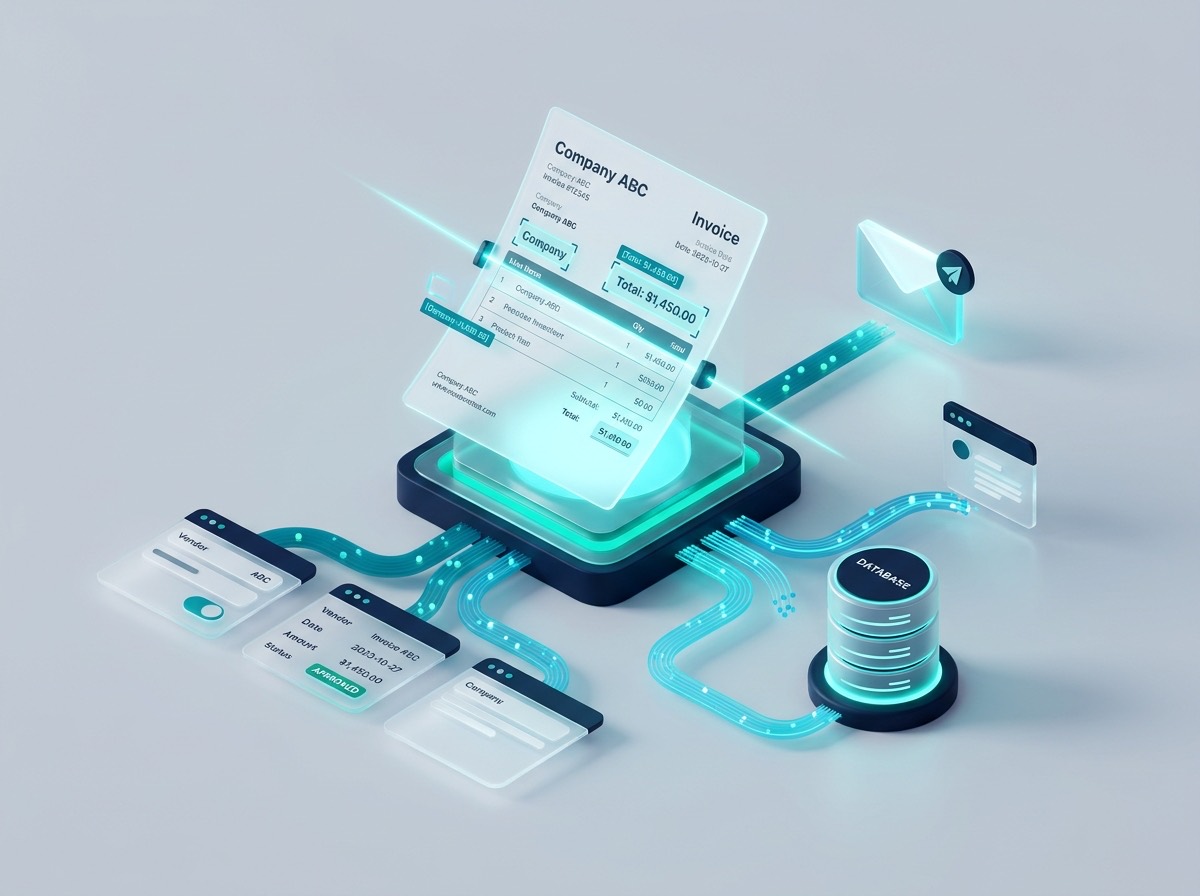
How an intelligent automation pipeline processes incoming vendor invoices from email to accounting system without manual data entry:
Invoice arrives in email inbox
A PDF invoice lands in invoices@yourcompany.com.
The monitoring agent detects it within seconds.
Automation identifies document type
The pipeline recognizes it as a vendor invoice rather than a statement, inquiry, or promotional spam.
AI extracts relevant fields
Vendor name, invoice date, due date, PO number, line items, tax breakdown, and total balance are extracted into structured JSON.
Business rule validation
The system verifies that the line items sum to the total, checks whether the PO exists in the ERP, and confirms the vendor is on the approved list.
Human review for exceptions
If the PO does not match or confidence on a total is below 95%, an interactive prompt is sent to the AP specialist on Slack or Teams with one-click approve/edit options.
Accounting system sync
Once approved, the structured bill is automatically posted to QuickBooks, NetSuite, or SAP, and the PDF is filed in cloud storage with complete metadata.
Public AI or Private AI for Workflows?
We configure the deployment model around the sensitivity of your operational data:
Public AI Automation
Fast setup • OpenAI, Claude, Gemini
Best suited for general email sorting, non-confidential customer FAQ triage, public social media lead routing, and marketing reporting drafts where data contains no sensitive IP or regulated PII.
Learn about Public AI with guardrailsPrivate AI Automation
On-Prem / Private VPC Hosting
Essential for workflows handling customer contracts, invoices with banking details, HR records, patient referrals, or proprietary operational data. Data never leaves your network.
Explore Private AI StackBuilt around your business, not a generic template
Off-the-shelf automation tools often fail because every company has unique exception rules, messy inputs, and legacy databases. We build customized workflows that handle edge cases gracefully, log every event for audits, and adapt as your processes evolve.
Find the 3 tasks your team
should
hand to AI
In a free 45-minute workflow audit, we review how your team spends its week, identify the top three tasks where automation delivers high ROI, and recommend public or private AI.